Overview
The curated dataset reflects a tidy version of the original data. This data is relatively project-neutral. A such, project-specific changes are often made to bring the data more in line with the research goals. This may include modifying the unit of observation and/ or adding additional attributes to the data. This process may generate one or more new datasets that are used for analysis.
In this recipe, we will explore a practical example of transforming data. This will include operations such as:
- Text normalization and tokenization
- Creating new variables by splitting, merging, and recoding existing variables
- Augmenting data with additional variables from other sources or resources
Along the way, we will employ a variety of tools and techniques to accomplish these tasks. Let's load the packages we will need for this recipe.
# Load packages
library(readr)
library(dplyr)
library(stringr)
library(tidyr)
library(tidytext)
library(qtalrkit)
In Lab 7, we will apply what we have learned in this recipe to a new dataset.
Concepts and strategies
Orientation
Curated datasets are often project-neutral. That is, they are not necessarily designed to answer a specific research question. Rather, they are designed to be flexible enough to be used in a variety of projects. This is a good thing, but it also means that we will likely need to transform the data to bring it more in line with our research goals. This can include normalizing text, modifying the unit of observation and/ or adding additional attributes to the data.
In this recipe, we will explore a practical example of transforming data. We will start with a curated dataset and transform it to reflect a specific research goal. The dataset we will use is the MASC dataset (Ide et al. 2008). This dataset contains a collection of words from a variety of genres and modalities of American English.
Tip Acquire and tidy the data
The MASC dataset is a curated version of the original data. This data is relatively project-neutral.
If you would like to acquire the original data and curate it for use in this recipe, you can do so by running the following code:
# Acquire the original data
qtalrkit::get_compressed_data(
  url = "..",
  target_dir = "data/original/masc/"
)

# Curate the data

# ... write a function and add it to the package
As a starting point, I will assume that the curated dataset is available in the data/derived/masc/ directory, as seen below.
data/
├── analysis/
├── derived/
│   ├── masc_curated_dd.csv
│   ├── masc/
│   │   ├── masc_curated.csv
├── original/
│   ├── masc_do.csv
│   ├── masc/
│   │   ├── ...
The first step is to inspect the data dictionary file. This file contains information about the variables in the dataset. It is also a good idea to review the data origin file, which contains information about the original data source.
Looking at the data dictionary, in Table 1.
| variable | name | description | variable_type |
|---|---|---|---|
| file | File | ID number of the source file | character |
| ref | Reference | Reference number within the source file | integer |
| base | Base | Base form of the word (lemma) | character |
| msd | MSD | Part-of-speech tag (PENN tagset) | character |
| string | String | Text content of the word | character |
| title | Title | Title of the source file | character |
| source | Source | Name of the source | character |
| date | Date | Date of the source file (if available) | character |
| class | Class | Classification of the source. Modality and genre | character |
| domain | Domain | Domain or topic of the source | character |
Let's read in the data and take a glimpse at it.
# Read the data
masc_curated <- read_csv("data/derived/masc/masc_curated.csv")

# Preview
glimpse(masc_curated)
## Rows: 591,097
## Columns: 10
## $ file <chr> "110CYL067", "110CYL067", "110CYL067", "110CYL067", "110CYL067"…
## $ ref <dbl> 0, 1, 2, 3, 4, 5, 6, 7, 8, 9, 10, 11, 12, 13, 14, 15, 16, 17, 1…
## $ base <chr> "december", "1998", "your", "contribution", "to", "goodwill", "…
## $ msd <chr> "NNP", "CD", "PRP$", "NN", "TO", "NNP", "MD", "VB", "JJR", "IN"…
## $ string <chr> "December", "1998", "Your", "contribution", "to", "Goodwill", "…
## $ title <chr> "110CYL067", "110CYL067", "110CYL067", "110CYL067", "110CYL067"…
## $ source <chr> "ICIC Corpus of Philanthropic Fundraising Discourse", "ICIC Cor…
## $ date <chr> NA, NA, NA, NA, NA, NA, NA, NA, NA, NA, NA, NA, NA, NA, NA, NA,…
## $ class <chr> "WR LT", "WR LT", "WR LT", "WR LT", "WR LT", "WR LT", "WR LT", …
## $ domain <chr> "philanthropic fundraising discourse", "philanthropic fundraisi…We may also want to do a summary overview of the dataset with the skimr package. This will give us a sense of the data types and the number of missing values.
── Data Summary ───────────────────────
                           Values
Name                       masc_curated
Number of rows             591097
Number of columns          10
_______________________
Column type frequency:
  character                9
  numeric                  1
________________________
Group variables            None

── Variable type: character ───────────
  skim_variable n_missing complete_rate min max empty n_unique whitespace
1 file                  0         1       3  40     0      392          0
2 base                  4         1.00    1  99     0    28010          0
3 msd                   0         1       1   8     0       60          0
4 string               25         1.00    1  99     0    39474          0
5 title                 0         1       3 203     0      373          0
6 source             5732         0.990   3 139     0      348          0
7 date              94002         0.841   4  17     0       62          0
8 class                 0         1       5   5     0       18          0
9 domain            18165         0.969   4  35     0       21          0

── Variable type: numeric ─────────────
  skim_variable n_missing complete_rate  mean    sd p0 p25  p50  p75  p100 hist
1 ref                   0             1 3854. 4633.  0 549 2033 5455 24519 ▇▂▁▁▁
In summary, the dataset contains 591,097 observations and 10 variables. The unit of observation is the word. The variable names are somewhat opaque, but the data dictionary provides some context that will help us understand the data.
Now we want to consider how we plan to use this data in our analysis. Let's assume that we want to use this data to explore lexical variation in the MASC dataset across modalities and genres. We will want to transform the data to reflect this goal.
In Table 2, we see an idealized version of the dataset we would like to have.
| doc_id | modality | genre | term_num | term | lemma | pos |
|---|---|---|---|---|---|---|
| ... | ... | ... | ... | ... | ... | ... |
Of note, in this recipe we will derive a single transformed dataset. In other projects, you may want to generate various datasets with different units of observations. It all depends on your research question and the research aim that you are adopting.
Transforming data
To get from the curated dataset to the idealized dataset, we will need to perform a number of transformations. Some of these transformations will be relatively straightforward, while others will require more work. Let's start with the easy ones.
- Let's drop the variables that we will not use and at the same time rename the variables to make them more intuitive.
We will use the select() function to drop or rename variables.
# Drop and rename variables
masc_df <-
  masc_curated |>
  select(
    doc_id = file,
    term_num = ref,
    term = string,
    lemma = base,
    pos = msd,
    mod_gen = class
  )

masc_df
## # A tibble: 591,097 × 6
## doc_id term_num term lemma pos mod_gen
## <chr> <dbl> <chr> <chr> <chr> <chr>
## 1 110CYL067 0 December december NNP WR LT
## 2 110CYL067 1 1998 1998 CD WR LT
## 3 110CYL067 2 Your your PRP$ WR LT
## 4 110CYL067 3 contribution contribution NN WR LT
## 5 110CYL067 4 to to TO WR LT
## 6 110CYL067 5 Goodwill goodwill NNP WR LT
## 7 110CYL067 6 will will MD WR LT
## 8 110CYL067 7 mean mean VB WR LT
## 9 110CYL067 8 more more JJR WR LT
## 10 110CYL067 9 than than IN WR LT
## # ℹ 591,087 more rowsThat's a good start on the structure.
- Next, we will split the
mod_genvariable into two variables:modalityandgenre.
We have a variable mod_gen that contains two pieces of information: modality and genre (e.g., WR LT). The information appears to separated by a space. We can make sure this is the case by tabulating the values. The count() function will count the number of occurrences of each value in a variable, and as a side effect it will summarize the values of the variable so we can see if there are any unexpected values.
## # A tibble: 18 × 2
##    mod_gen     n
##    <chr>   <int>
##  1 SP TR   71630
##  2 WR EM   62036
##  3 WR FC   38608
##  4 WR ES   34938
##  5 WR FT   34373
##  6 WR BL   33278
##  7 WR JO   33042
##  8 WR JK   32420
##  9 WR NP   31225
## 10 SP MS   29879
## 11 WR NF   29531
## 12 WR TW   28128
## 13 WR GV   27848
## 14 WR TG   27624
## 15 WR LT   26468
## 16 SP FF   23871
## 17 WR TC   19419
## 18 SP TP    6779
Looks good, our values are separated by a space. We can use the separate_wider_delim() function from the tidyr package to split the variable into two variables. We will use the delim argument to specify the delimiter and the names argument to specify the names of the new variables.
# Split mod_gen into modality and genre
masc_df <-
  masc_df |>
  separate_wider_delim(
    cols = mod_gen,
    delim = " ",
    names = c("modality", "genre")
  )

masc_df
## # A tibble: 591,097 × 7
## doc_id term_num term lemma pos modality genre
## <chr> <dbl> <chr> <chr> <chr> <chr> <chr>
## 1 110CYL067 0 December december NNP WR LT
## 2 110CYL067 1 1998 1998 CD WR LT
## 3 110CYL067 2 Your your PRP$ WR LT
## 4 110CYL067 3 contribution contribution NN WR LT
## 5 110CYL067 4 to to TO WR LT
## 6 110CYL067 5 Goodwill goodwill NNP WR LT
## 7 110CYL067 6 will will MD WR LT
## 8 110CYL067 7 mean mean VB WR LT
## 9 110CYL067 8 more more JJR WR LT
## 10 110CYL067 9 than than IN WR LT
## # ℹ 591,087 more rows- Create a document id variable.
Now that we have the variables we want, we can turn our attention to the values of the variables. Let's start with the doc_id variable. This may a good variable to use as the document id. If we take a look at the values, however, we can see that the values are not very informative.
Let's use the distinct() function to only show the unique values of the variable. We will also chain a slice_sample() function to randomly select a sample of the values. This will give us a sense of the values in the variable.
# Preview doc_id
masc_df |>
  distinct(doc_id) |>
  slice_sample(n = 10)
## # A tibble: 10 × 1
## doc_id
## <chr>
## 1 JurassicParkIV-INT
## 2 111367
## 3 NYTnewswire6
## 4 sw2014-ms98-a-trans
## 5 52713
## 6 new_clients
## 7 cable_spool_fort
## 8 jokes10
## 9 wsj_2465
## 10 wsj_0158You can run this code various times to get a different sample of values.
Since the doc_id variable is not informative, let's replace the variable's values with numeric values. In the end, we want a digit for each unique document and we want the words in each document to be grouped together.
To do this we will need to group the data by doc_id and then generate a new number for each group. We can achieve this by passing the data grouped by doc_id (group_by()) to the mutate() function and then using the cur_group_id() function to generate a number for each group.
# Recode doc_id
masc_df <-
  masc_df |>
  group_by(doc_id) |>
  mutate(doc_id = cur_group_id()) |>
  ungroup()

masc_df
## # A tibble: 591,097 × 7
## doc_id term_num term lemma pos modality genre
## <int> <dbl> <chr> <chr> <chr> <chr> <chr>
## 1 1 0 December december NNP WR LT
## 2 1 1 1998 1998 CD WR LT
## 3 1 2 Your your PRP$ WR LT
## 4 1 3 contribution contribution NN WR LT
## 5 1 4 to to TO WR LT
## 6 1 5 Goodwill goodwill NNP WR LT
## 7 1 6 will will MD WR LT
## 8 1 7 mean mean VB WR LT
## 9 1 8 more more JJR WR LT
## 10 1 9 than than IN WR LT
## # ℹ 591,087 more rowsTo check, we can again apply the count() function.
## # A tibble: 392 × 2
##     doc_id     n
##      <int> <int>
##   1    158 24520
##   2    300 22261
##   3    112 18459
##   4    113 17986
##   5    215 17302
##   6    312 14752
##   7    311 13376
##   8    200 13138
##   9    217 11753
##  10    186 10665
##  11    140 10064
##  12    304  9417
##  13    154  9277
##  14     98  8959
##  15    152  8862
##  16    238  7617
##  17    240  7580
##  18    155  7361
##  19     79  7217
##  20     80  7032
##  21    230  6931
##  22    233  6887
##  23     77  6850
##  24     76  6839
##  25    156  6664
##  26     78  6435
##  27    162  6251
##  28    203  5665
##  29    137  5654
##  30    163  5330
##  31    151  5155
##  32    231  5059
##  33    211  4656
##  34    243  4291
##  35     83  4269
##  36    216  4263
##  37     92  4148
##  38     81  3874
##  39    242  3785
##  40    219  3752
##  41    235  3745
##  42    201  3713
##  43    236  3514
##  44    303  3481
##  45    183  3353
##  46    153  3340
##  47    251  3295
##  48    171  3198
##  49    172  3151
##  50    252  3072
##  51    170  3054
##  52    169  3038
##  53    253  2848
##  54    259  2841
##  55     84  2768
##  56    166  2730
##  57    167  2691
##  58    199  2562
##  59     85  2557
##  60     82  2470
##  61    283  2387
##  62    184  2349
##  63    250  2290
##  64    198  2246
##  65    310  2242
##  66    254  2151
##  67    205  2147
##  68    181  2099
##  69    187  1978
##  70    229  1938
##  71    195  1804
##  72    260  1734
##  73     75  1697
##  74    191  1696
##  75    245  1694
##  76    255  1682
##  77    257  1613
##  78    248  1594
##  79    244  1539
##  80    220  1468
##  81    213  1451
##  82    308  1443
##  83    234  1441
##  84    274  1433
##  85    247  1426
##  86    196  1414
##  87    179  1371
##  88    256  1364
##  89    209  1354
##  90    176  1336
##  91    307  1326
##  92    258  1275
##  93    249  1271
##  94    223  1269
##  95    225  1240
##  96    241  1203
##  97    226  1171
##  98    227  1144
##  99    228  1131
## 100    178  1103
## 101    150  1102
## 102    214  1102
## 103    266  1092
## 104    192  1063
## 105    232  1030
## 106    149  1023
## 107    246  1015
## 108    363  1013
## 109    141  1004
## 110    197   989
## 111    177   982
## 112    309   974
## 113    164   941
## 114    190   936
## 115    353   932
## 116    271   931
## 117    286   925
## 118    189   923
## 119    193   904
## 120    143   901
## 121    139   898
## 122    175   888
## 123    298   885
## 124    332   879
## 125    391   869
## 126    147   858
## 127    297   851
## 128     26   842
## 129     86   842
## 130    261   831
## 131    212   815
## 132     54   810
## 133     12   809
## 134    173   801
## 135    146   797
## 136     21   796
## 137    221   794
## 138    224   794
## 139    306   794
## 140     42   790
## 141    145   783
## 142    165   766
## 143    126   760
## 144    148   758
## 145    138   754
## 146     66   749
## 147    355   748
## 148    299   741
## 149    392   741
## 150     71   724
## 151     30   707
## 152    239   701
## 153    185   692
## 154    204   688
## 155    174   652
## 156      3   649
## 157    180   646
## 158    202   620
## 159    390   620
## 160    136   616
## 161    121   612
## 162    279   603
## 163      1   596
## 164     51   593
## 165    305   575
## 166    144   564
## 167      9   533
## 168    123   533
## 169    124   533
## 170      2   522
## 171    119   510
## 172    295   509
## 173    280   506
## 174    291   506
## 175     11   495
## 176    282   490
## 177    194   484
## 178    268   482
## 179      5   481
## 180     60   460
## 181    301   459
## 182     63   458
## 183      7   454
## 184    222   451
## 185     20   446
## 186    168   444
## 187    288   441
## 188    237   440
## 189    354   438
## 190     64   435
## 191     93   435
## 192    102   433
## 193    125   425
## 194     36   423
## 195    114   420
## 196    275   420
## 197     58   417
## 198    352   415
## 199    374   412
## 200    350   410
## 201     62   407
## 202    120   405
## 203     70   403
## 204    206   403
## 205    294   402
## 206    278   399
## 207    210   395
## 208    263   393
## 209    292   390
## 210     14   389
## 211    105   380
## 212     61   374
## 213     10   364
## 214    128   364
## 215     89   362
## 216    387   360
## 217    342   359
## 218    111   358
## 219    129   358
## 220     13   348
## 221     34   348
## 222     33   347
## 223     38   344
## 224    117   340
## 225     91   337
## 226     59   333
## 227     16   332
## 228    132   330
## 229     65   323
## 230    290   322
## 231    218   314
## 232     57   313
## 233    389   313
## 234     35   308
## 235     37   307
## 236     40   307
## 237    281   306
## 238     95   305
## 239    296   302
## 240     22   300
## 241    108   299
## 242     50   291
## 243    388   291
## 244     73   283
## 245     68   281
## 246    358   281
## 247    207   279
## 248    338   279
## 249     46   275
## 250     69   274
## 251     90   268
## 252    131   265
## 253     67   262
## 254     72   260
## 255    130   260
## 256    265   260
## 257    135   259
## 258     88   258
## 259     94   257
## 260    277   256
## 261    115   253
## 262    101   252
## 263    357   250
## 264    107   245
## 265    262   245
## 266    317   245
## 267     96   243
## 268     41   240
## 269     45   238
## 270    157   237
## 271    293   237
## 272    142   236
## 273    349   230
## 274    335   228
## 275      4   224
## 276    371   224
## 277     29   223
## 278    134   220
## 279     39   218
## 280    161   217
## 281    375   217
## 282    365   214
## 283     43   213
## 284    369   212
## 285    315   211
## 286    384   211
## 287    104   210
## 288    319   210
## 289     49   206
## 290    366   205
## 291     87   203
## 292     48   202
## 293    346   202
## 294    122   201
## 295    351   201
## 296    313   199
## 297    343   198
## 298    318   196
## 299    285   195
## 300    333   195
## 301    364   194
## 302    378   194
## 303     15   193
## 304    264   190
## 305    373   190
## 306    382   189
## 307     55   187
## 308    386   187
## 309     74   185
## 310    330   185
## 311    109   184
## 312     17   183
## 313     53   177
## 314    368   177
## 315    287   176
## 316     23   175
## 317     56   175
## 318    284   175
## 319    289   175
## 320    383   173
## 321    380   172
## 322    381   172
## 323     19   169
## 324    370   168
## 325      6   167
## 326    269   166
## 327    345   163
## 328    326   162
## 329     18   160
## 330    276   160
## 331    116   159
## 332    302   158
## 333     99   157
## 334    272   157
## 335    103   155
## 336    385   154
## 337    372   153
## 338    270   151
## 339    379   150
## 340     52   149
## 341    182   149
## 342    334   146
## 343    376   146
## 344     31   143
## 345    377   143
## 346    133   140
## 347    361   138
## 348    273   136
## 349    325   135
## 350    328   135
## 351    127   134
## 352    322   134
## 353    336   134
## 354     24   133
## 355     47   132
## 356    316   131
## 357    327   131
## 358     27   127
## 359    340   127
## 360    337   124
## 361    320   122
## 362    348   121
## 363    331   120
## 364    323   118
## 365    362   116
## 366    208   114
## 367     32   113
## 368     25   111
## 369    339   111
## 370    188   110
## 371    367   110
## 372    324   108
## 373      8   106
## 374    347   105
## 375     44   104
## 376    344   103
## 377    360    99
## 378    267    98
## 379    341    97
## 380    359    97
## 381    160    95
## 382     28    94
## 383    159    93
## 384    106    90
## 385    118    90
## 386    321    89
## 387    329    86
## 388    110    80
## 389    100    71
## 390    314    63
## 391     97    52
## 392    356    45
We have 392 unique documents in the dataset. We also can see that the word lengths vary quite a bit. That's something we will need to keep in mind as we move forward into the analysis.
- Check the values of the
posvariable.
The pos variable contains the part-of-speech tags for each word. The PENN Treebank tagset is used. Let's take a look at the values to get familiar with them, and also to see if there are any unexpected values.
Let's use the slice_sample() function to randomly select a sample of the values. This will give us a sense of the values in the variable.
# Preview pos
masc_df |>
  slice_sample(n = 10)
## # A tibble: 10 × 7
## doc_id term_num term lemma pos modality genre
## <int> <dbl> <chr> <chr> <chr> <chr> <chr>
## 1 303 2511 proliferation proliferation NN WR TC
## 2 76 5245 And and CC WR FT
## 3 300 17170 DAVY davy NNP SP MS
## 4 80 5341 ” ” NN WR FT
## 5 171 900 . . . WR TG
## 6 166 2588 out out RP WR BL
## 7 67 58 organization organization NN WR LT
## 8 216 2944 include include VB WR TG
## 9 234 1304 donation donation NN WR LT
## 10 231 3539 say say VB WR NFAfter running this code a few times, we can see that the many of the values are as expected. There are, however, some unexpected values. In particular, some punctuation and symbols are tagged as nouns.
We can get a better appreciation for the unexpected values by filtering the data to only show non alpha-numeric values (^\\W+$) in the term column and then tabulating the values by term and pos.
# Filter and tabulate
masc_df |>
  filter(str_detect(term, "^\\W+$")) |>
  count(term, pos) |>
  arrange(-n) |>
  print(n = 20)
## # A tibble: 152 × 3
## term pos n
## <chr> <chr> <int>
## 1 "," , 27112
## 2 "." . 26256
## 3 "\"" '' 5495
## 4 ":" : 4938
## 5 "?" . 3002
## 6 ")" ) 2447
## 7 "(" ( 2363
## 8 "-" : 1778
## 9 "!" . 1747
## 10 "/" NN 1494
## 11 "’" NN 1319
## 12 "-" - 1213
## 13 "”" NN 1076
## 14 "“" NN 1061
## 15 "]" NN 1003
## 16 "[" NN 1001
## 17 ";" : 991
## 18 "--" : 772
## 19 ">" NN 752
## 20 "..." ... 716
## # ℹ 132 more rowsAs we can see from the sample above and from the PENN tagset documentation, most punctuation is tagged as the punctuation itself. For example, the period is tagged as . and the comma is tagged as ,. Let's edit the data to reflect this.
Let's look at the code, and then we will discuss it.
# Recode
masc_df <-
  masc_df |>
  mutate(pos = case_when(
    str_detect(term, "^\\W+$") ~ str_sub(term, start = 1, end = 1),
    TRUE ~ pos
  ))

# Check
masc_df |>
  filter(str_detect(term, "^\\W+$")) |> # preview
  count(term, pos) |>
  arrange(-n) |>
  print(n = 20)
## # A tibble: 127 × 3
## term pos n
## <chr> <chr> <int>
## 1 "," "," 27113
## 2 "." "." 26257
## 3 "\"" "\"" 5502
## 4 ":" ":" 4939
## 5 "?" "?" 3002
## 6 "-" "-" 2994
## 7 ")" ")" 2447
## 8 "(" "(" 2363
## 9 "!" "!" 1747
## 10 "/" "/" 1495
## 11 "’" "’" 1325
## 12 "”" "”" 1092
## 13 "“" "“" 1078
## 14 "]" "]" 1003
## 15 "[" "[" 1001
## 16 ";" ";" 993
## 17 "--" "-" 772
## 18 ">" ">" 753
## 19 "..." "." 747
## 20 "'" "'" 741
## # ℹ 107 more rowsThe case_when() function allows us to specify a series of conditions and values. The first condition is that the term variable contains only non alpha-numeric characters. If it does, then we want to replace the value of the pos variable with the first character of the term variable, str_sub(term, start = 1, end = 1). If the condition is not met, then we want to keep the original value of the pos variable, TRUE ~ pos.
We can see that our code worked by filtering the data to only show non alpha-numeric values (^\\W+$) in the term column and then tabulating the values by term and pos.
For completeness, I will also recode the lemma values for these values as well as the lemma can some times be multiple punctuation marks (e.g. !!!!!, ---, etc.) for these terms.
# Recode
masc_df <-
  masc_df |>
  mutate(lemma = case_when(
    str_detect(term, "^\\W+$") ~ str_sub(term, start = 1, end = 1),
    TRUE ~ lemma
  ))

# Check
masc_df |>
  filter(str_detect(term, "^\\W+$")) |> # preview
  count(term, lemma) |>
  arrange(-n) |>
  print(n = 20)
## # A tibble: 127 × 3
## term lemma n
## <chr> <chr> <int>
## 1 "," "," 27113
## 2 "." "." 26257
## 3 "\"" "\"" 5502
## 4 ":" ":" 4939
## 5 "?" "?" 3002
## 6 "-" "-" 2994
## 7 ")" ")" 2447
## 8 "(" "(" 2363
## 9 "!" "!" 1747
## 10 "/" "/" 1495
## 11 "’" "’" 1325
## 12 "”" "”" 1092
## 13 "“" "“" 1078
## 14 "]" "]" 1003
## 15 "[" "[" 1001
## 16 ";" ";" 993
## 17 "--" "-" 772
## 18 ">" ">" 753
## 19 "..." "." 747
## 20 "'" "'" 741
## # ℹ 107 more rows- Check the values of the
modalityvariable.
The modality variable contains the modality tags for each document. Let's take a look at the values.
Let's tabulate the values with count().
# Tabulate modality
masc_df |>
  count(modality)
## # A tibble: 2 × 2
## modality n
## <chr> <int>
## 1 SP 132159
## 2 WR 458938We see that the values are SP and WR, which stand for spoken and written, respectively. To make this a bit more transparent, we can recode these values to Spoken and Written. We will use the case_when() function to do this.
# Recode modality
masc_df <-
  masc_df |>
  mutate(
    modality = case_when(
      modality == "SP" ~ "Spoken",
      modality == "WR" ~ "Written"
    )
  )

masc_df
## # A tibble: 591,097 × 7
## doc_id term_num term lemma pos modality genre
## <int> <dbl> <chr> <chr> <chr> <chr> <chr>
## 1 1 0 December december NNP Written LT
## 2 1 1 1998 1998 CD Written LT
## 3 1 2 Your your PRP$ Written LT
## 4 1 3 contribution contribution NN Written LT
## 5 1 4 to to TO Written LT
## 6 1 5 Goodwill goodwill NNP Written LT
## 7 1 6 will will MD Written LT
## 8 1 7 mean mean VB Written LT
## 9 1 8 more more JJR Written LT
## 10 1 9 than than IN Written LT
## # ℹ 591,087 more rows- Check the values of the
genrevariable.
Let's look at the values of the genre variable.
## # A tibble: 18 × 2
##    genre     n
##    <chr> <int>
##  1 BL    33278
##  2 EM    62036
##  3 ES    34938
##  4 FC    38608
##  5 FF    23871
##  6 FT    34373
##  7 GV    27848
##  8 JK    32420
##  9 JO    33042
## 10 LT    26468
## 11 MS    29879
## 12 NF    29531
## 13 NP    31225
## 14 TC    19419
## 15 TG    27624
## 16 TP     6779
## 17 TR    71630
## 18 TW    28128
These genre labels are definitely cryptic. The data dictionary does not list these labels and their more verbose descriptions. However, looking at the original data's README, we can find the file (resource-headers.xml) that lists these genre labels.
1. 'BL' for blog
2. 'NP' is newspaper
3. 'EM' is email
4. 'ES' is essay
5. 'FT' is fictlets
6. 'FC' is fiction
7. 'GV' is government
8. 'JK' is jokes
9. 'JO' is journal
10. 'LT' is letters
11. 'MS' is movie script
12. 'NF' is non-fiction
13. 'FF' is face-to-face
14. 'TC' is technical
15. 'TG' is travel guide
16. 'TP' is telephone
17. 'TR' is transcript
18. 'TW' is twitter
Now we can again use the case_when() function. This time we will see if genre is equal to one of the genre labels and if it is, then we will replace the value with the more verbose description.
# Recode genre
masc_df <-
  masc_df |>
  mutate(
    genre = case_when(
      genre == "BL" ~ "Blog",
      genre == "NP" ~ "Newspaper",
      genre == "EM" ~ "Email",
      genre == "ES" ~ "Essay",
      genre == "FT" ~ "Fictlets",
      genre == "FC" ~ "Fiction",
      genre == "GV" ~ "Government",
      genre == "JK" ~ "Jokes",
      genre == "JO" ~ "Journal",
      genre == "LT" ~ "Letters",
      genre == "MS" ~ "Movie script",
      genre == "NF" ~ "Non-fiction",
      genre == "FF" ~ "Face-to-face",
      genre == "TC" ~ "Technical",
      genre == "TG" ~ "Travel guide",
      genre == "TP" ~ "Telephone",
      genre == "TR" ~ "Transcript",
      genre == "TW" ~ "Twitter"
    )
  )

masc_df
## # A tibble: 591,097 × 7
## doc_id term_num term lemma pos modality genre
## <int> <dbl> <chr> <chr> <chr> <chr> <chr>
## 1 1 0 December december NNP Written Letters
## 2 1 1 1998 1998 CD Written Letters
## 3 1 2 Your your PRP$ Written Letters
## 4 1 3 contribution contribution NN Written Letters
## 5 1 4 to to TO Written Letters
## 6 1 5 Goodwill goodwill NNP Written Letters
## 7 1 6 will will MD Written Letters
## 8 1 7 mean mean VB Written Letters
## 9 1 8 more more JJR Written Letters
## 10 1 9 than than IN Written Letters
## # ℹ 591,087 more rowsDuring the process of transformation and afterwards, it is a good idea to tabulate and/ or visualize the dataset. This provides us an opportunity to get to know the dataset better and also may help us identify inconsistencies that we would like to address in the transformation, or at least be aware of as we move towards analysis.
# How many documents are in each modality?
masc_df |>
  distinct(doc_id, modality) |>
  count(modality) |>
  arrange(-n)
## # A tibble: 2 × 2
## modality n
## <chr> <int>
## 1 Written 371
## 2 Spoken 21
# How many documents are in each genre?
masc_df |>
  distinct(doc_id, genre) |>
  count(genre) |>
  arrange(-n)
## # A tibble: 18 × 2
## genre n
## <chr> <int>
## 1 Email 174
## 2 Newspaper 54
## 3 Letters 49
## 4 Blog 21
## 5 Jokes 16
## 6 Journal 12
## 7 Essay 8
## 8 Fiction 7
## 9 Travel guide 7
## 10 Face-to-face 6
## # ℹ 8 more rows
# What is the averge length of documents (in words)?
masc_df |>
  group_by(doc_id) |>
  summarize(n = n()) |>
  summarize(
    mean = mean(n),
    median = median(n),
    min = min(n),
    max = max(n)
  )
## # A tibble: 1 × 4
## mean median min max
## <dbl> <dbl> <int> <int>
## 1 1508. 418. 45 24520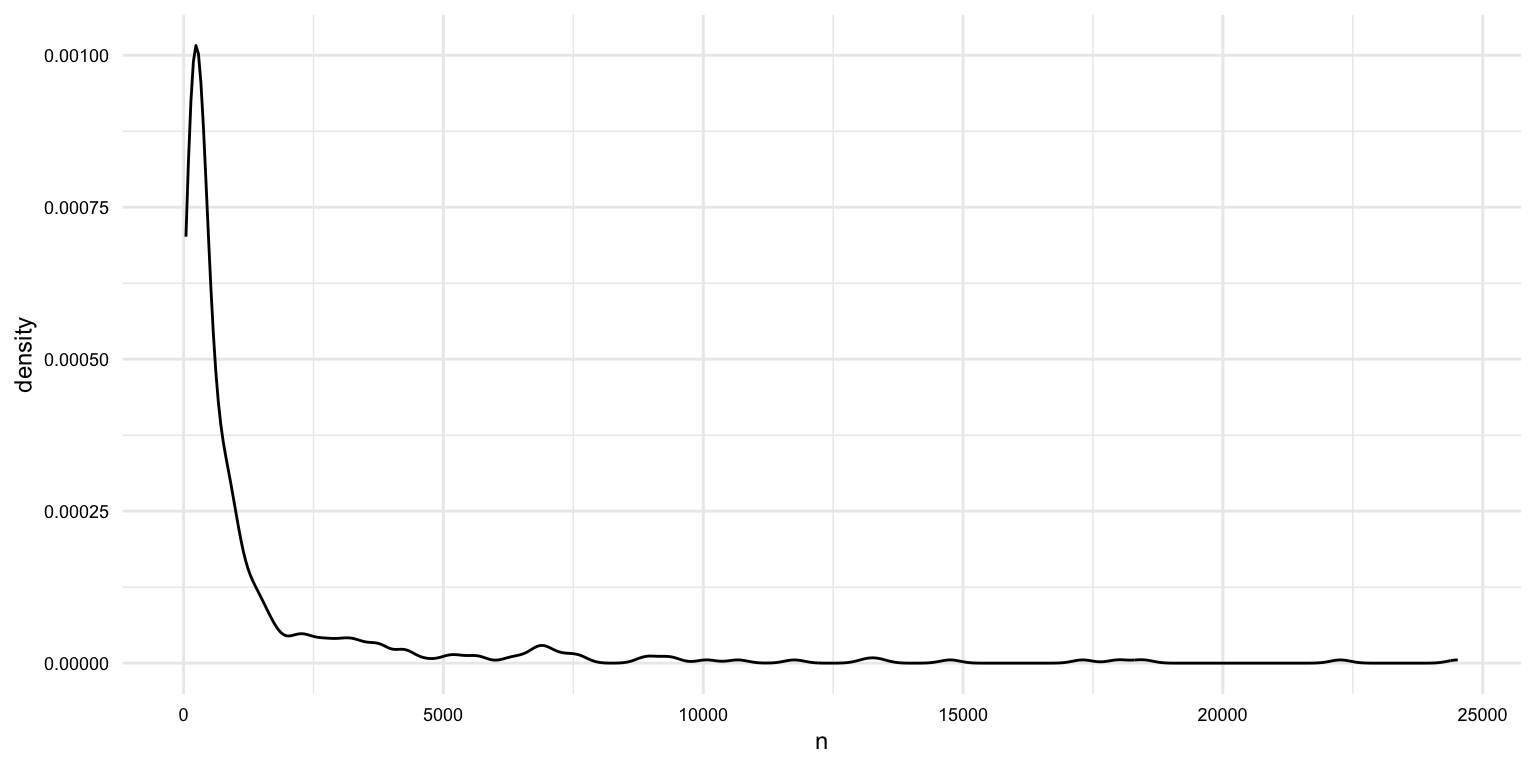
# What is the distribution of the length of documents by modality?
masc_df |>
  group_by(doc_id, modality) |>
  summarize(n = n()) |>
  ggplot(aes(x = n, fill = modality)) +
  geom_density(alpha = 0.5)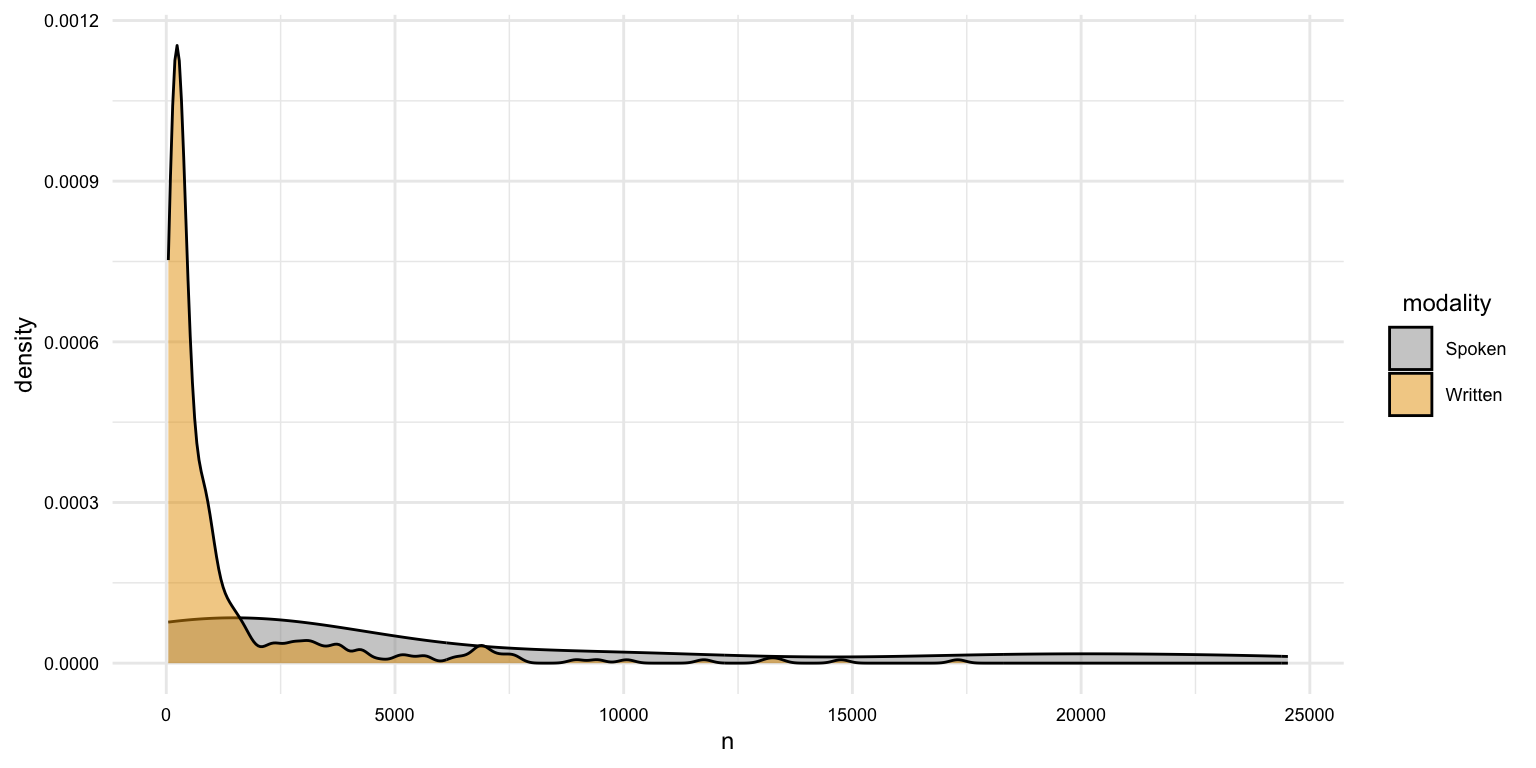
# What is the distribution of the length of documents by genre?
masc_df |>
  group_by(doc_id, modality, genre) |>
  summarize(n = n()) |>
  ggplot(aes(x = genre, y = n)) +
  geom_boxplot() +
  facet_wrap(~ modality, scales = "free_x") +
  theme(axis.text.x = element_text(angle = 45, hjust = 1))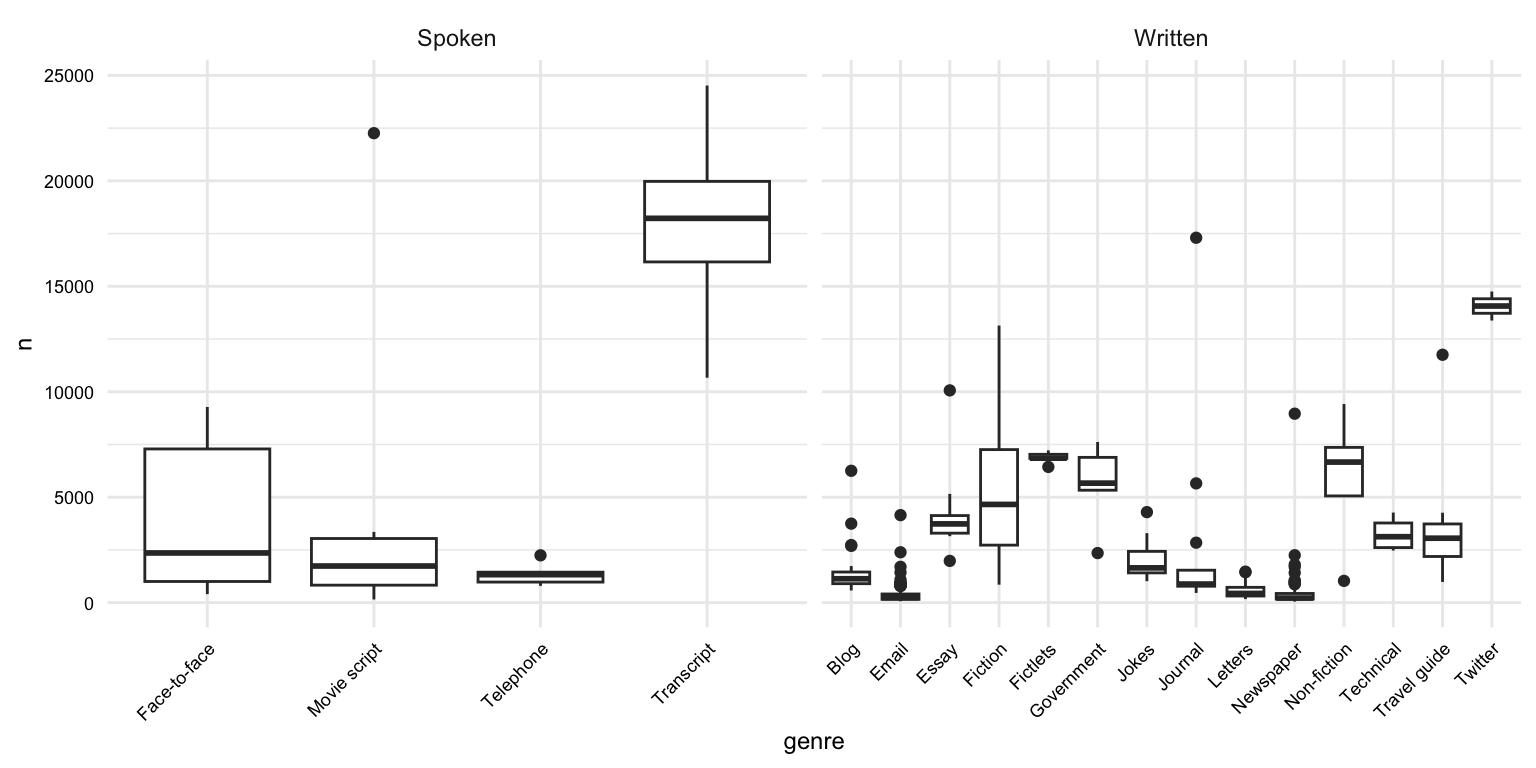
Once we are satisfied with the structure and values of the dataset, we can save it to a file. We will use the write_csv() function from the readr package to do this.
# Save the data
write_csv(masc_df, "data/derived/masc/masc_transformed.csv")
The structure of the data/ directory in our project should now look like this:
Documenting data
The last step is to document the process and the resulting dataset(s). In this particular case we only derived one transformed dataset. The documentation steps are the same as in the curation step. We will organize and document the process file (often a .qmd file) and then create a data dictionary for each of the transformed datasets. The create_data_dictionary() function can come in handy for scaffolding the data dictionary file.
# Create a data dictionary
create_data_dictionary(
  data = masc_df,
  file_path = "data/derived/masc/masc_transformed_dd.csv"
)
Summary
In this recipe, we have looked at an example of transforming a curated dataset. This recipe included operations such as:
- Text normalization
- Variable recoding
- Splitting variables
In other projects, the transformation steps will inevitably differ, but these strategies are commonly necessary in almost any project.
Just as with other steps in the data preparation process, it is important to document the transformation steps. This will help you and others understand the process and the resulting dataset(s).
Check your understanding
- Which function would you use to remove duplicate rows in a dataset?
-
The
str_c()function from thestringrpackage is used to separate strings rather than combine them. -
The
count()function from thedplyrpackage is used to tabulate the values of a variable. - If you want to recode the age of learners into categories such as "child", "teen", and "adult" based on their age, which function should you use?
- To normalize text by removing leading and trailing whitespace, you use the
()function from thestringrpackage. - To normalize text by converting all characters to lowercase, you use the
()function from thestringrpackage.
Lab preparation
In preparation for Lab 7, review and ensure you are comfortable with the following:
- Vector, data frame, and list data structures
- Subsetting and filtering data structures with and without regular expressions
- Reshaping datasets by rows and columns
In this lab, we will practice these skills and expand our knowledge of data preparation by transforming and documenting data with Tidyverse packages such as dplyr, tidyr, and stringr.
You will have a choice of a dataset to transform. Before you start the lab, you should consider which dataset you would like to use, what the idealized structure the transformed dataset will take, and what strategies you will likely employ to transform the dataset. You should also consider the information you need to document the data transformation process.